

Your ride plan should shape the booking, not the other way around. A ride booking app in Kenya can help you request an airport transfer, a direct point-to-point trip, or a ride by the hour. Enter your pickup and destination, choose the trip type, then compare the fare and payment options shown before you book.
It’s reasonable to want a clear fare, a convenient payment method, and an easy way to connect with your driver. This guide explains how ride bookings work, what can affect the fare, and how cash and digital payments fit into the process. You’ll also learn what happens after you request a ride, from driver matching to trip tracking. Use these details to choose an option that suits your route, schedule, and budget, whether you’re heading to the airport, travelling across town, or making several stops.
Key Takeaways
- Choose an airport, point-to-point, or hourly booking based on your route and schedule.
- Compare the fare shown in the app and select a payment option that suits your trip.
- Learn how ride requests connect you with drivers and what trip details to review.
- Explore the available ride-booking options in Kenya, including ROVO, to find a fit for your journey.
Airport, point-to-point and hourly taxi bookings
No single ride booking app can be identified as the most popular throughout Kenya. Compare apps available for your trip, focusing on ride options, upfront fare information, and payment methods.
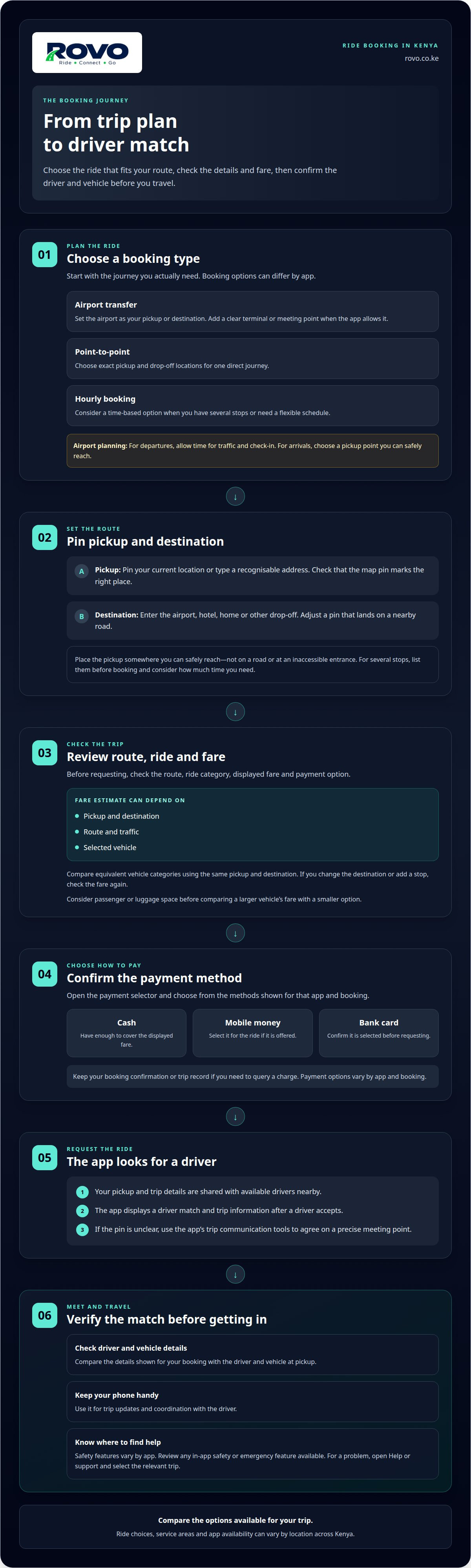
Choose a booking type before entering your route. For an airport transfer, set the airport as your pickup or destination, then enter the other address. Add a clear meeting point, such as a hotel entrance or office building. For a point-to-point trip, enter exact pickup and drop-off locations. This suits a direct journey, such as travelling from home to a meeting. For hourly use, choose a time-based option when you need several stops or a flexible schedule.
- Set the pickup: Pin your current location or type a recognisable address. Check the map pin before continuing.
- Add the destination: Enter the airport, hotel, home, or other drop-off point. Adjust the pin if it lands on a nearby road.
- Select the trip type: Choose point-to-point for one destination, or hourly booking for planned stops.
- Review the request: Check the route, ride category, displayed fare, and payment option.
Airport trips benefit from a little extra planning. Include the terminal or meeting location in your pickup instructions if the app allows it. For a departure, allow time for traffic and airport check-in. For an arrival, choose a pickup point where you can meet the driver. Place the pin somewhere you can safely reach, not on a road or inaccessible entrance.
If your schedule includes several stops, list them before booking and consider how much time you need. A direct trip is more suitable for one point-to-point journey. Match the ride option to your itinerary so you can compare the fare and details for the trip you actually plan to take.
App popularity varies by location. Compare the options available for your trip, including ride categories, fare details, and payment methods.
App ride pricing and payment options
A ride booking app in Kenya calculates the fare using the trip details you enter. The estimate can depend on your pickup, destination, route, traffic, and selected vehicle. A short trip and an airport transfer may have different fares, even in the same app. Review the amount before requesting a ride, and check it again if you change your destination or add a stop.
Payment options vary by app and booking. Before confirming, open the payment selector and choose from the methods shown, such as cash, mobile money, or a bank card. If you choose cash, have enough to cover the displayed fare. For a digital payment, confirm that it is selected for that ride. Keep your booking confirmation or trip record if you need to query a charge.
- Compare similar trips: Enter the same pickup and destination, then compare equivalent vehicle categories and displayed fares.
- Check your route: Review the map pin and planned journey. A misplaced pickup or added stop can change the trip.
- Confirm payment: Check the selected method on the booking screen before requesting a driver.
Comparing ride booking apps in Kenya is easier when you compare similar journeys. For example, consider whether you need more space for passengers or luggage before comparing a larger vehicle’s fare with a smaller option. Where possible, keep route changes and payment details in the app so your trip information stays together.
Safety features vary between apps. Before your ride, review the driver and vehicle details shown for your booking. Use any in-app safety or emergency feature available. To report a problem, open the app’s Help or support section and select the relevant trip. Include useful details, such as a fare question or pickup issue.
To explore an option for app-based travel, review ride-booking choices in Kenya and the trip details before confirming.
How taxi-hailing apps connect riders and drivers
When you request a ride, the app shares your trip details with available drivers nearby. It then displays a driver match and the trip information.
Rider and Driver Connections
Enter your pickup point and destination to request a ride. The app uses those details to connect you with an available driver. Before meeting, compare the driver and vehicle information with the details in your booking. A precise pickup pin helps you and the driver find the same meeting point, especially near a busy entrance or shopping centre. Keep your phone handy for trip updates and coordination.
Driver and Passenger Requirements
Drivers follow each platform’s onboarding process and rules, while riders need an account to request a trip. A ride app may link your phone number to your identity to provide its services. Use your own account details, enter accurate trip information, and follow the app’s instructions during pickup and travel. Account requirements vary, so follow the prompts when setting up your account.
Available Ride-Hailing Apps
Ride-hailing app options and service areas differ across Kenya. Coverage can depend on the pickup location and available drivers, so enter your town or neighbourhood in the app to see whether you can request a ride there. The same platform may show different ride choices in Nairobi and a smaller town. Compare the displayed vehicle categories and booking options for your location.
Booking a Ride Through an App
To book, create an account, enter your pickup point and destination, then choose a ride option. Review the trip details and fare before submitting your request. Once a driver accepts, compare the driver and vehicle details with the app before getting in. If the pickup pin is unclear, use the app’s trip communication tools to agree on a precise meeting point.
For drivers, platform onboarding explains the steps and conditions for joining. For riders, accurate account and destination details help the app connect the request to a suitable driver. Before confirming any booking, check that the pickup pin, destination, vehicle choice, and payment selection match your plan.
What ride-hailing apps are available in Kenya?
Ride-hailing app availability can vary by pickup point, vehicle type, and driver supply. The NTSA register of authorized ride-hailing firms in Kenya was effective from October 31, 2022. Use that register as one reference point, then compare the services currently displayed for your pickup area.
No single app suits every journey. One rider may prioritise a car for a weekday commute, while another needs to see whether an app covers a pickup outside a major urban centre. App names and options can change, so compare the ride category, route coverage, fare display, and payment methods available for your trip.
- Check your location: Enter your pickup point and destination to see whether an app offers a ride on that route.
- Compare ride types: Review vehicle categories for the same journey, such as an economy car or a larger vehicle.
- Review booking details: Compare the displayed fare, payment choices, driver information, and trip features before requesting.
For example, an app may offer rides near a transport hub but not from a pickup point outside its active service area. Enter both ends of your trip rather than relying on a general location label. This also shows whether your preferred vehicle category is available for that journey.
Use the NTSA register’s effective date as context, not as a live list of every app currently available. Then compare the options shown in the apps for your actual trip. Use the same pickup, destination, similar vehicle type, and intended payment method for a fair comparison. Brand recognition alone is not a reliable guide. The route and options displayed for your journey matter more.
Once you find an app that covers your route, save your pickup details and review the booking screen before confirming. Comparing the details for your specific journey helps you choose according to your location and travel needs, whether you’re planning a regular commute or a one-off trip elsewhere in Kenya.
ROVO: ROVO ride-booking app
ROVO gives Kenyan riders an app for booking everyday trips. Choose Economy, Comfort, or SUV according to your journey and space needs. The app shows fares with no hidden charges, so review the trip details and displayed fare before requesting a ride.
Use ROVO when you want to book a ride through an app and follow your trip as it progresses. Verified drivers and real-time trip tracking help you keep key ride details in view. Quick booking keeps the request process straightforward, while 24/7 support is available for assistance.
To book, choose a ride category, enter your pickup and destination, then review the fare and booking details. ROVO also offers delivery solutions for moving items, separate from passenger rides.
Visit ROVO’s ride-booking app to explore the service.
Make your next journey easier to plan
Choose a ride booking app in Kenya that suits your journey. Before booking, consider your pickup point, destination, preferred ride category, and payment method. This simple check helps you choose an option for an airport transfer, a regular trip, or a day with several stops.
ROVO brings ride booking and delivery solutions together in one app, so you can arrange a ride or move an item. When you’re ready to travel, choose a ride option and review the trip information before confirming. Select the service that suits your immediate need.
Ready to explore your options? Contact ROVO about your ride and take the next step toward your journey. A clear plan makes it easier to get moving.
Frequently Asked Questions
What are the fares and per-kilometre rates for ride apps in Kenya?
Fares and per-kilometre rates vary by app, route, ride category, and trip conditions, so there is no single rate for every Kenyan journey. Check the fare shown for your exact trip before requesting a driver. To compare options, enter the same pickup and destination in each app, compare similar vehicle categories, and note any fare changes when you edit the route.
What payment methods do ride booking apps accept in Kenya, including M-Pesa?
Payment methods depend on the app and the options shown for your booking. An app may offer M-Pesa, cash, or card, but don’t assume every app accepts each method. Open the payment selector before confirming and choose your preferred option. For M-Pesa, check the phone number and payment prompt carefully, then keep the transaction confirmation with your ride record.
Which Kenyan cities and towns are covered by ride-hailing apps?
Coverage varies by pickup location, vehicle type, and available drivers. Enter your location and both ends of your trip in the app to see which services and ride options are available.
What safety features and emergency support do ride apps offer in Kenya?
Safety features vary by app. Review the driver and vehicle details before your ride, use any in-app safety or emergency feature available, and report problems through the app’s Help or support section. ROVO offers verified drivers and real-time trip tracking.

